Skip to content
Part of the Sunflow Hotel Operations Platform

Hotel F&B operations: every outlet, one admin panel

The restaurant, bar, pool, beach and room service produce hundreds of orders a day. Sunflow brings them into one flow, routes each one to the right department and turns the data behind them into F&B analytics. Your team focuses on service, your managers on decisions.

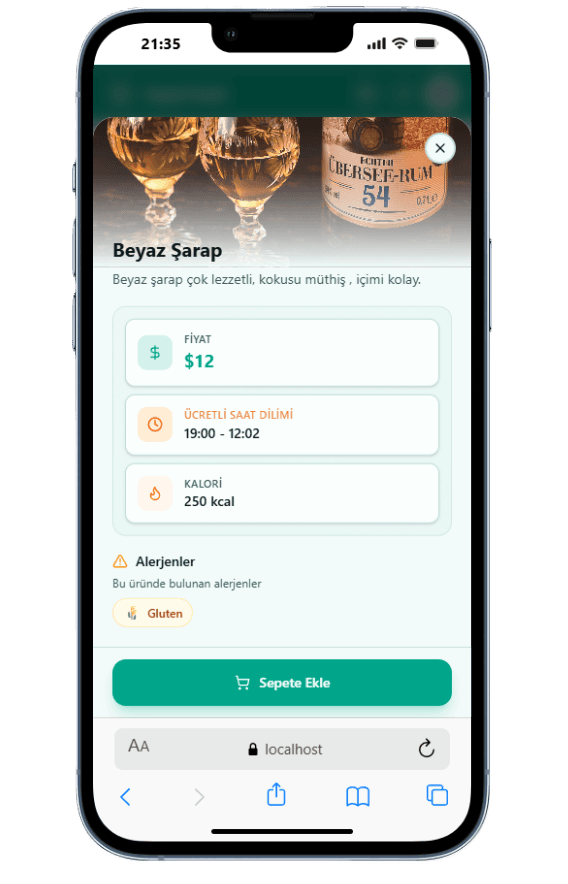
Sunflow product detail screen on a guest's phone with a photo, price and allergen information

From scattered outlets to one F&B flow

Hotel F&B usually runs in pieces. The bar keeps its own notebook, the kitchen writes down orders that came over the radio and room service answers the phone. At the end of the day, working out what each outlet sold, which orders were cancelled or when the team struggled takes hours.

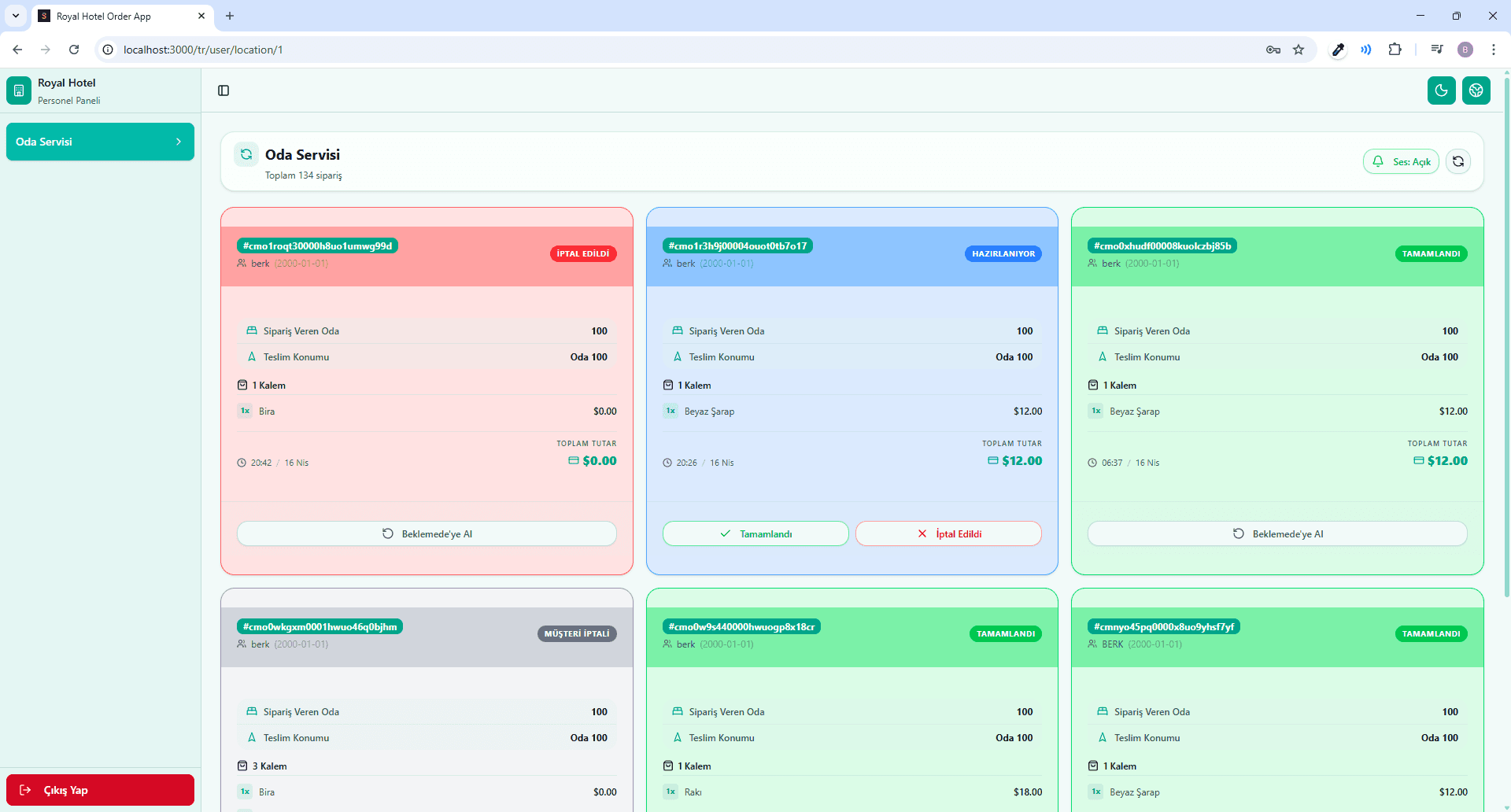
In Sunflow every outlet is set up as a location with its own QR code. Wherever a guest orders, the order enters the same system and goes to the bar, kitchen or room service with the room or location attached. Staff screens show only their own location's orders, which move through Pending, Preparing and Completed columns while the guest follows the status on their phone.

In all-inclusive hotels the same item can be free at one time of day and paid at another. You set the time slots in the panel and guests see what is included before they order. Guest notes are translated into the staff's language, so a language gap doesn't turn into a service mistake.

A by-product of this flow is clean data. Each order is stored with its location, time, items and status, so the F&B analytics screens fill up without any extra data entry.

Highlights

  • Restaurant, bar, pool, beach and room service in one flow
  • Staff screens per location
  • Paid and complimentary time slots
  • Sales, cancellation and profitability analytics
How it works

From order to report in three steps

The same order serves the guest first, then management.

  1. 01

    An order comes in from an outlet

    The guest scans the QR code at the table, on the lounger or in the room and orders in their own language. The order carries its room or location.

  2. 02

    The right team prepares it

    The order lands on the relevant department's screen. The team moves it to Preparing and Completed; guests who allowed notifications get an alert.

  3. 03

    The data becomes a report

    Sales, cancellations and hourly load build up in the panel. Managers see daily, weekly and monthly reports there and receive them by email.

Screens

Screens your team and managers use

Real screenshots taken from the app.

  • panel.sunflowapp.com
    Staff order screen

    Staff order screen

    Orders sit in Pending, Preparing and Completed columns; each card shows the room or location and the guest's note.

  • panel.sunflowapp.com
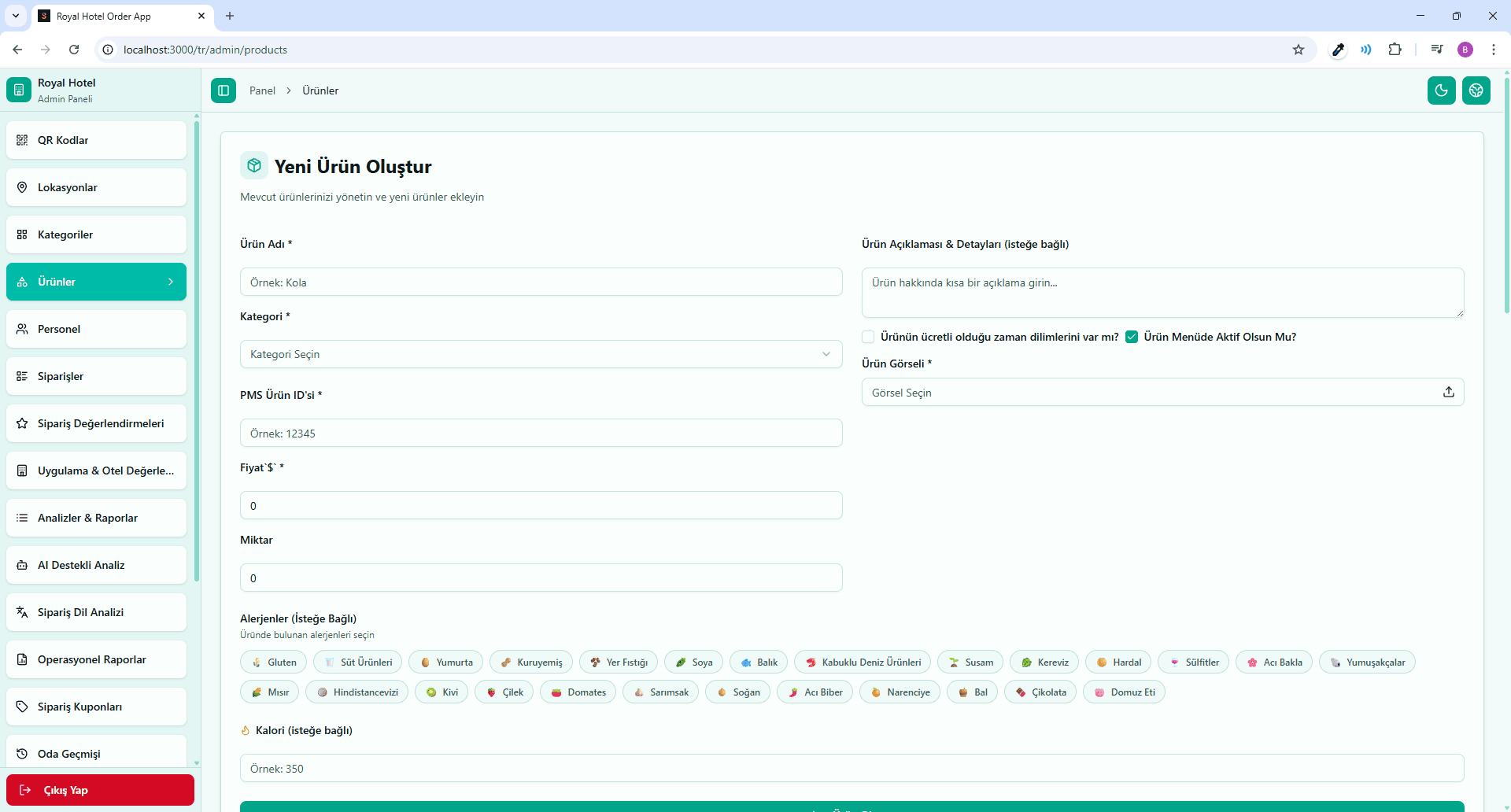
    Product management

    Product management

    Products, categories, prices, images, allergens and calories are edited in the admin panel.

  • panel.sunflowapp.com
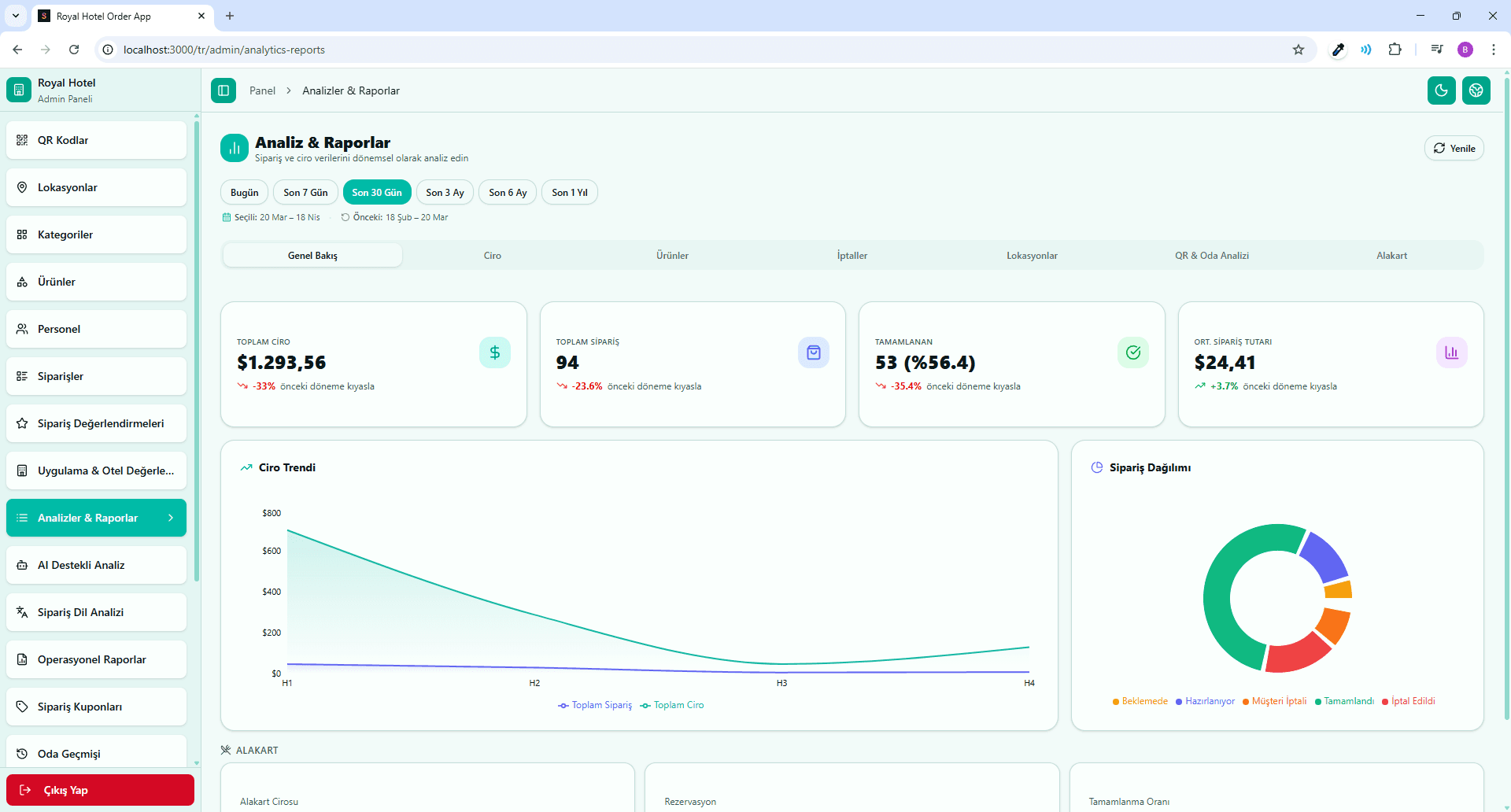
    Analytics dashboard

    Analytics dashboard

    Revenue, best sellers, cancellations, locations and hourly distribution at a glance.

F&B management software that informs decisions

The analytics screens look at sales from several angles: revenue by location and product, hourly distribution, best sellers, cancellations and the languages guests order in. Menu profitability shows which items really earn their place on the menu, and lost-revenue detection shows where opportunities slip away. Whenever you need them, reports download as Excel or CSV.

The AI layer builds on this data. Season and demand forecasts, guest segment analysis, smart menu suggestions, campaign suggestions and a daily AI plan tell managers what they could do next, while anomaly detection flags an unusual drop or spike. A dedicated F&B performance analytics module, measuring outlets and teams in more depth, is coming soon.

Access is clear as well. With general manager, manager and staff roles, everyone reaches only the screens they need. Campaigns and coupons are set up in the same panel, and room-based order history is always at hand. The Sunflow team handles setup, including the menu, locations, QR codes and staff accounts. Setup and day-to-day use are easy.


Platform

Other parts of the platform

All of them run in the same guest portal and the same admin panel.

Blog

Related articles

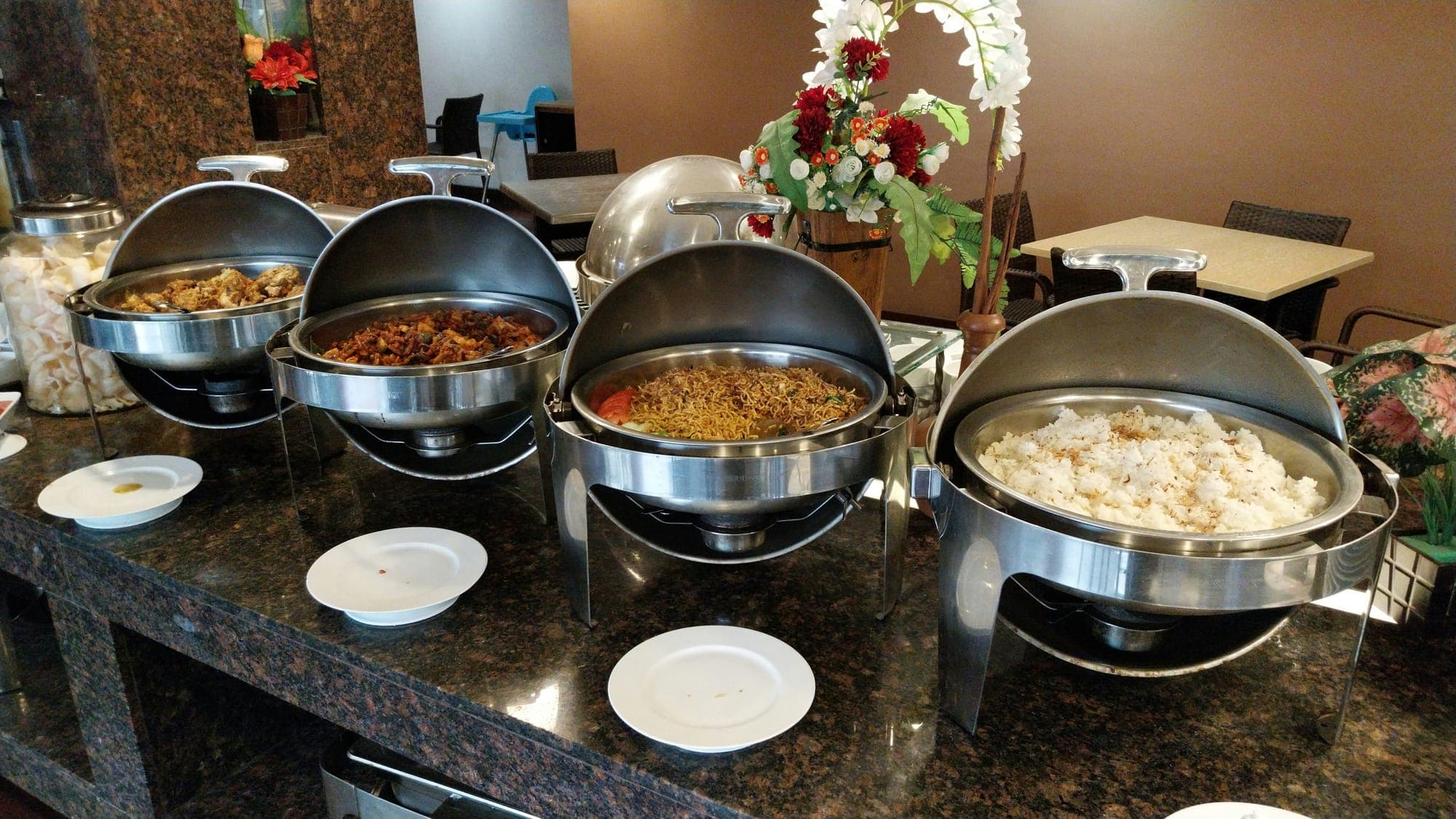
  • Buffet service in a hotel restaurantDigital Transformation

    7 min read

    Steps to Digitalise Your Hotel's F&B Operations

    Digitalisation does not end with printing a QR code. We walk through the steps of taking hotel F&B digital, from mapping outlets and menu rules to order routing and measurement.

FAQ

Frequently asked questions

Every outlet in your hotel, such as restaurants, bars, the pool, the beach and room service, can be set up as a location. Each location has its own QR code, and orders are routed to the relevant department: bar, kitchen or room service.

You define time slots for products: they show as free during the included hours and as paid outside them. Guests see this on the menu before they place an order.

The Sunflow team enters your menu during setup. After that you update products, categories, prices, images and allergens yourself in the admin panel, and changes appear on the guest menu right away.

The panel covers revenue, products, cancellations, locations, hourly distribution, best sellers and language analytics. AI adds menu profitability, segment analysis, season and demand forecasts, lost-revenue detection, anomaly detection and menu suggestions. Reports are also emailed to managers daily, weekly and monthly. A separate F&B performance analytics module is in development.

No. The staff order screen opens in the browser and shows only the orders for that person's location. Staff move an order forward with one tap; there is no separate app to install.

Let's Talk

Let's schedule a demo call tailored to your hotel

Every hotel is different. Let's discover together which modules suit you best.

Free · No commitment · Easy setup