

 Platform & Technology
2 min read
What Is a Hotel Guest Portal System? Why Every Hotel Needs One
Portal systems that start with a QR scan and provide single-point access to all hotel services — and the value they bring.
Guests scan the QR code in their room, verify with their room number and place the order. The extension line stays free, nothing gets misheard, and the room service team sees each order on screen together with the room it came from.
In classic room service the guest calls the extension, reads the menu from a printed card and orders out loud. At busy times the line is engaged, talking to guests in another language gets harder and orders can be written down wrong. And the guest waits without knowing when the order will arrive.
With Sunflow's room service ordering system the menu is on the guest's phone, in their language. The order reaches the room service team in writing, with the room number. The guest sees the estimated delivery time and a tracking number on screen, and the status updates as the team prepares the order. Order notes carry special requests to the kitchen in writing too.
Guests have to verify before they can order. That keeps room service open only to guests staying at the hotel and puts every order on the right room.
The room service menu has photos and categories, with allergen and calorie details next to each product. Guests can add a note and use a discount code if they have one, so most questions that used to come by phone are answered on the order screen.
Highlights
The guest doesn't call, the team doesn't take notes.
The guest scans the QR code in the room with their phone; the portal opens in their language.
They verify with room number and date of birth, choose from the menu and add an order note.
The order lands on the room service screen with the room number and staff get notified; the guest sees the estimated time and tracking number.
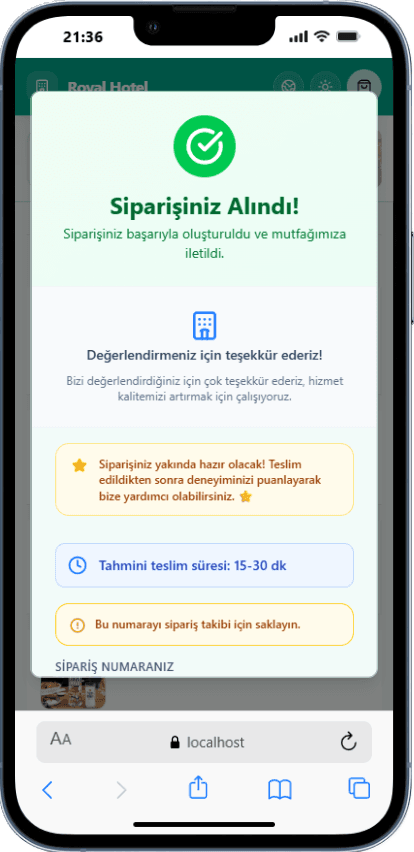
Real screenshots taken from the app.
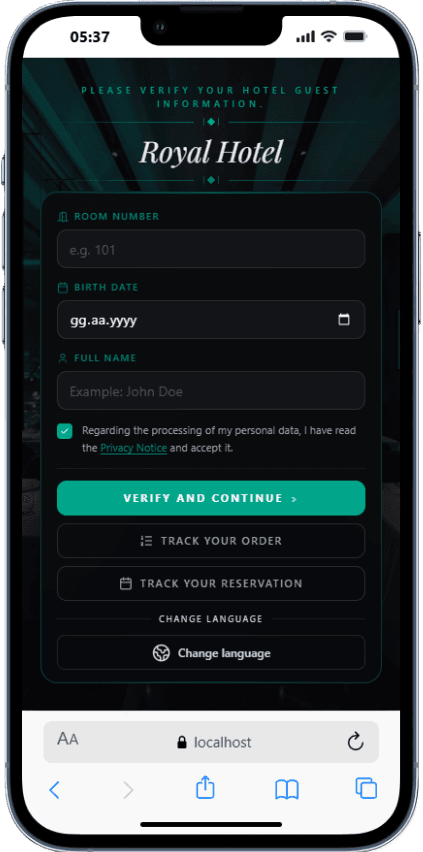
Sign-in with room number and date of birth; only staying guests can order.
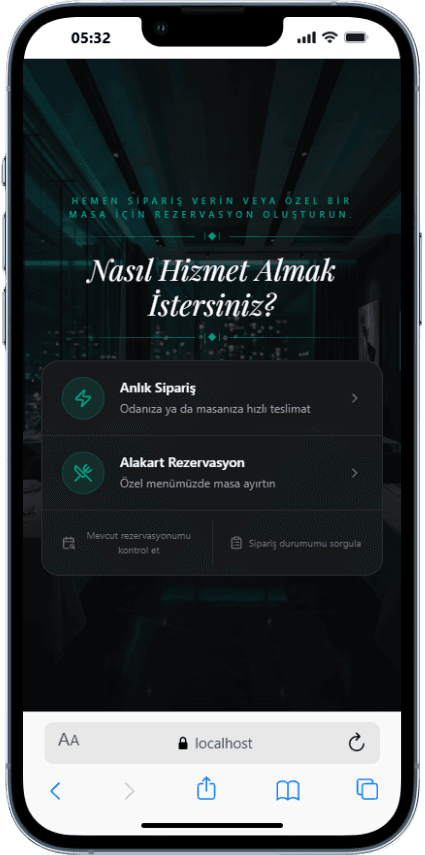
Guests choose between a room service order and an à la carte reservation.
Estimated delivery time and tracking number on screen as soon as the order is placed.
The admin panel keeps the order history of every room: orders placed, total spend and guest notes. That record makes it easier to spot a guest's repeat preferences and to clear up a disputed order. In hotels with PMS integration, verification runs against the stay and no extra personal data is asked from the guest.
After delivery, guests rate delivery speed, taste, temperature and presentation. These ratings are analysed over time, so the reports show when room service struggles and which products get low scores. Reports are prepared daily, weekly and monthly and reach managers in the panel and by email. That shows you low-rated products and busy hours, so you can adjust the menu and staff planning.
Room service runs in the same panel as the other services, as part of the Sunflow hotel operations platform. Managers follow room service orders together with restaurant, bar, pool and beach orders on one screen, while staff only see the orders of their own location. Our team handles the setup, including room QR codes, the menu and staff access.
All of them run in the same guest portal and the same admin panel.
Guest services with one QR, hotel operations in one panel.
Digital menu ordering from restaurants, bars and every location.
Location-based ordering and service in outdoor areas.
Bookings from the guest's phone for paid or included restaurants.
Orders from every outlet, department routing and F&B analytics.
Multi-criteria ratings after orders and à la carte dinners.
Orders, reviews and daily, weekly and monthly reports.
Platform & Technology2 min read
Portal systems that start with a QR scan and provide single-point access to all hotel services — and the value they bring.
 Digital Transformation
2 min read
All-inclusive is the hotel type most suited to digitalization. QR ordering, paid/complimentary distinction, and guest data — it's time to manage everything on one platform.
Let's Talk
Every hotel is different. Let's discover together which modules suit you best.
Free · No commitment · Easy setup