Skip to content
Part of the Sunflow Hotel Operations Platform

À la carte reservation system: the table on the guest's phone, the list in your panel

Guests choose one of your à la carte restaurants, look through its menu and pick a day and an available time on their phone. If there is a birthday or an allergy, they add a note. The booking lands in the reservation list in your admin panel at the same moment, and there is no morning queue at the guest relations desk.

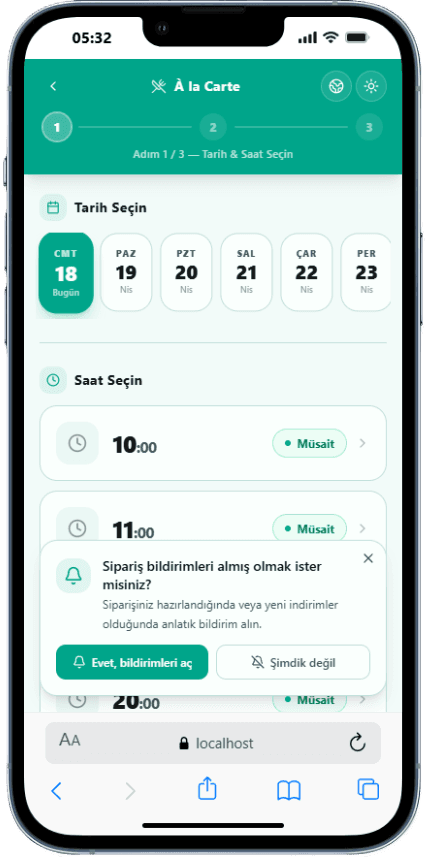
Date and time selection for an à la carte restaurant on the guest's phone

From the booking book to digital hotel restaurant reservations

In all-inclusive hotels, à la carte restaurants are one of the experiences guests look forward to most. Yet bookings are often taken the old way: guests come to the guest relations desk in the morning, wait in line and ask which times are free, and the staff member writes it into a book or a spreadsheet. Conversations take longer with guests who speak another language, and special requests often never reach the restaurant.

Sunflow's à la carte reservation system moves this to the guest's phone. In the portal, the guest opens reservations, sees the hotel's restaurants and previews their menus. Then they pick a date, and only the available times are listed. Once they confirm, the booking is done and the confirmation screen appears.

You can run several restaurants in the same system. One can be paid and another included in the package; both follow the same flow. While booking, guests can leave a special request: a birthday surprise, an allergy, a preference for a quiet table. The note reaches the restaurant team together with the booking, so the table is prepared before the guest arrives. You can also create à la carte discount codes with a validity period and a usage limit.

The process doesn't end when dinner does. From the same portal, guests rate their à la carte experience, and these ratings show which restaurant and which evenings left guests happy. Booking data also flows into the reports: reservation revenue and the language breakdown of the guests who book appear in the panel.


Highlights

  • Several restaurants, paid or included in the package
  • Date and available time picked on the phone
  • Menu preview and special request note
  • Guest rating after dinner
How it works

The life of an à la carte booking

Guests book on the phone, the restaurant prepares from the list.

  1. 01

    Choose a restaurant

    In the portal the guest sees the à la carte restaurants, looks through the menus and sees which ones are paid and which are included.

  2. 02

    Book a date and time

    They pick a day and one of the available times, add a special request such as a birthday or an allergy, and confirm the booking.

  3. 03

    Dine and rate

    The booking appears in that restaurant's list in the panel. The guest comes to dinner and then rates the experience in the portal.

Screens

Both sides of a booking

Real screenshots from the guest's phone and the admin panel.

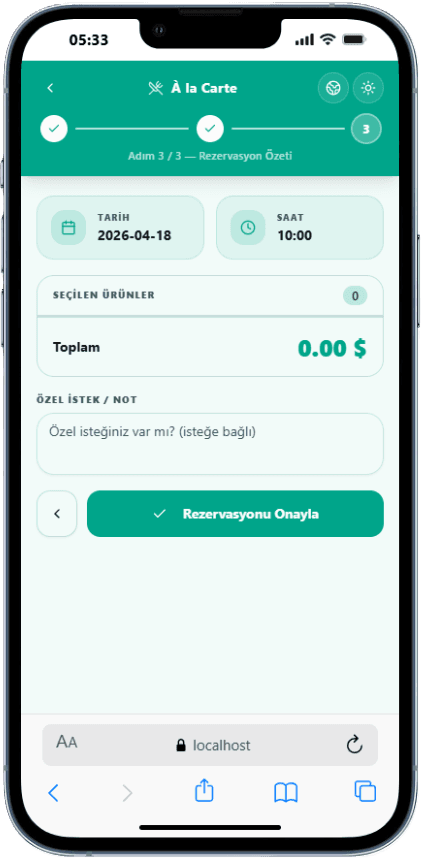
  • Booking confirmation

    Booking confirmation

    The guest clearly sees the chosen restaurant, date and time on the confirmation screen.

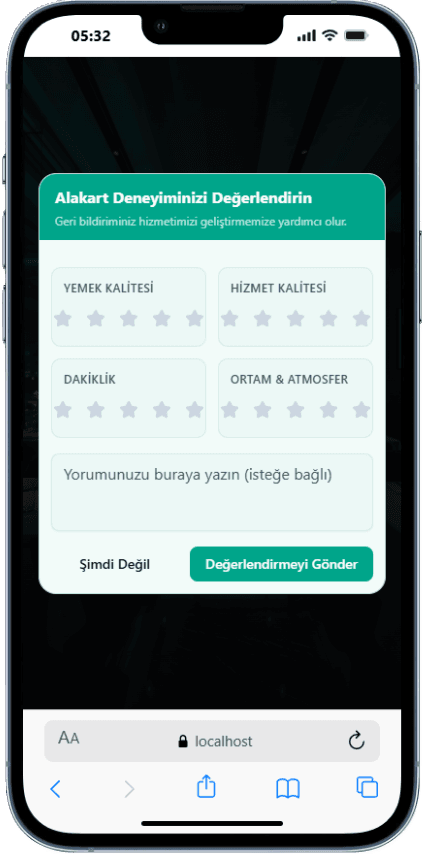
  • Rating after dinner

    Rating after dinner

    After the meal, guests rate their à la carte experience in a few taps.

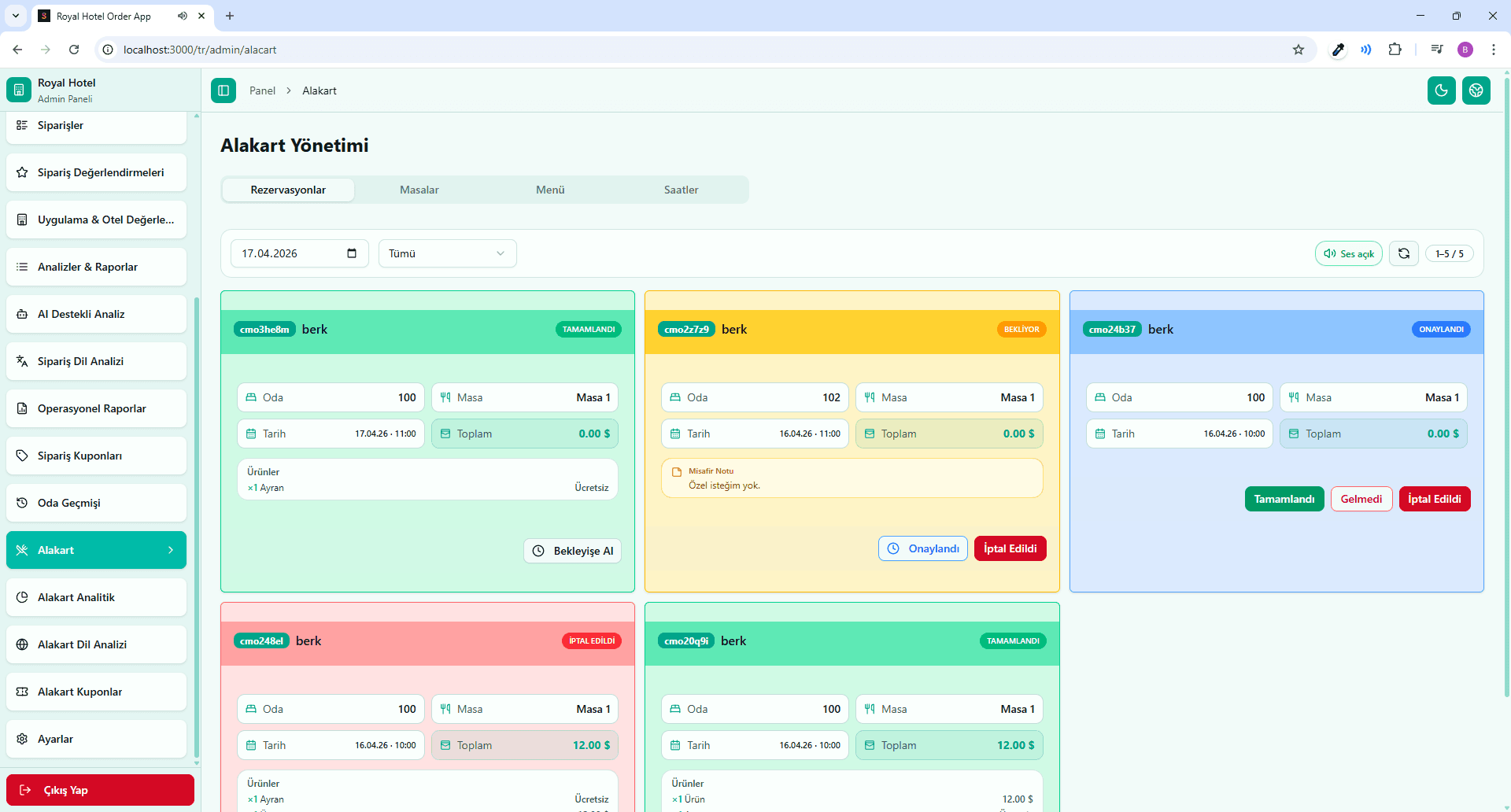
  • panel.sunflowapp.com
    Reservation list in the panel

    Reservation list in the panel

    The restaurant team follows incoming bookings, times and guest notes in the admin panel.

What changes for the restaurant and guest relations teams?

Bookings are listed restaurant by restaurant in the admin panel. The team sees who is coming at what time and which note the guest left, all on one screen, with no phone calls to confirm and no handwriting to decode. The guest relations desk can spend the time it used to spend on booking questions with guests instead.

The panel includes reservation analytics: revenue from paid restaurants and the language breakdown of guests who book. Together with the ratings after dinner, this shows which restaurant is in demand and where the experience needs work. Reports are prepared daily, weekly and monthly in the panel and by email.

À la carte reservations are part of the Sunflow hotel operations platform. Guests use the same portal to place QR orders, ask for room service and book a table, and you manage it all from the same admin panel. The Sunflow team handles the setup: we enter your restaurants, menus and staff access, so what is left for you is easy setup and easy use.

Platform

Other parts of the platform

All of them run in the same guest portal and the same admin panel.

Blog

Related articles

FAQ

Frequently asked questions

Yes. Each restaurant can be set as paid or included in the package. Guests book both from the same screen and see which restaurant is paid before they book.

They are all managed in the same system. Guests see the restaurants in a list, check their menus and choose one; in the panel, each restaurant's bookings are listed separately.

Every booking a guest makes lands in the reservation list in the admin panel. The team sees the date, time and guest note there, along with analytics such as reservation revenue and language breakdown.

Yes. While booking, guests can leave a note, for example a birthday celebration or an allergy. The note appears with the booking in the panel.

Yes. Reservations run in the same guest portal and the same admin panel as QR ordering, room service and guest reviews. Guests reach all of them with one QR code.

Let's Talk

Let's schedule a demo call tailored to your hotel

Every hotel is different. Let's discover together which modules suit you best.

Free · No commitment · Easy setup